Stop jumping between browser tabs. Learn how Air Live Drive maps cloud storage as local drives to streamline your professional project management and file sharing.
The hidden cost of context switching
For modern digital professionals, the browser has become a cluttered workspace. Managing multiple cloud storage providers like Google Drive, OneDrive, and SharePoint through web interfaces leads to a phenomenon known as “Context Switching.” Research shows that even brief interruptions, like opening a browser to find a share link, can take significant time to recover from in terms of mental focus.
Furthermore, traditional cloud sync clients are no longer sustainable for professionals handling large datasets. They force a trade-off: either you sync everything and run out of local disk space, or you use “selective sync” and find yourself constantly heading back to the web UI to find files that aren’t on your machine.

Mapping the cloud as a virtual file system
Air Live Drive functions as a cloud mapper, transforming remote storage into accessible local disk drives. It effectively bridges the gap between the speed of local work and the scale of cloud storage without the overhead of background synchronization.
1. Streamlining the sharing workflow
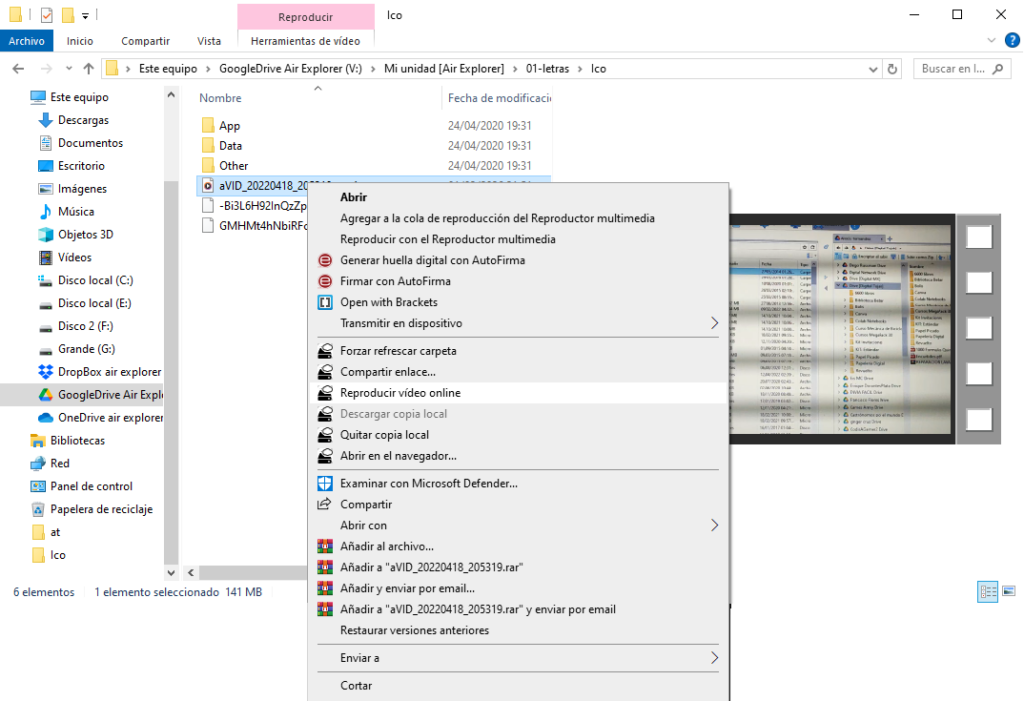
By integrating directly into the Windows Explorer shell, Air Live Drive brings web-only features to the desktop. This allows for a “Right-Click Workflow” that is significantly faster than any web-based alternative:
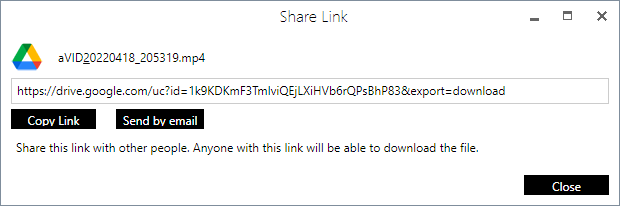
- “Create shared link”: You can generate a public or private URL for any file or folder instantly. This is crucial for account managers who need to send deliverables to clients mid-conversation.
- “Watch video”: This feature allows for instant streaming of video assets. Instead of downloading a 2GB file just to check a 10-second clip, you can view it directly from your virtual drive.
- Background uploads: The software includes an optional background upload system. This means you can save a file to your cloud drive and continue working immediately while Air Live Drive handles the data transfer in the background.
2. Scalable organization for agencies and power users
For freelancers and agencies managing multiple clients, the ability to mount unlimited drives (in the Pro version) is a game-changer. You can assign a specific drive letter to each client’s SharePoint or Google Drive account. This physical separation of data prevents cross-contamination of files and makes searching across all connected clouds much more intuitive than searching through browser bookmarks.
Strategic integration: The “Air” ecosystem
To maintain a professional and honest approach to your data strategy, it is essential to recognize where Air Live Drive fits within your toolkit:
- Access vs. Management: Use Air Live Drive for your daily “live” work. However, when you need to perform mass migrations or encrypt sensitive data before it even reaches the cloud, Air Explorer is the specialized tool for the job.
- Capacity Optimization: If you are hitting storage limits, Air Cluster allows you to join multiple accounts from the same or different providers into one massive cloud. While you access these accounts through Air Live Drive for daily tasks, Air Cluster ensures you never run out of “virtual” space by pooling your resources together.
Final thoughts
Transitioning to a virtual drive workflow with Air Live Drive isn’t just about saving disk space, it’s about reclaiming your focus. By keeping your files where they belong (in the cloud) but making them act like they are local, you achieve the perfect balance of accessibility and performance.
You can check more information about more features here:
-Top RaiDrive alternative: Air Live Drive
-Turn Dropbox into a virtual drive
-Access multiple cloud accounts as local disks easily
