
The challenge of managing multiple cloud accounts
In today’s digital world, most professionals and businesses rely on several cloud storage services. Google Drive for collaboration, Dropbox for sharing large files, OneDrive for Office documents, Mega for personal backups, the list goes on.
But here’s the problem:
- Constant switching between platforms wastes time.
- Multiple logins create confusion and slow down workflows.
- Limited desktop integration means you often need to download files before editing.
- Storage duplication occurs when syncing clouds locally, eating up valuable disk space.
For freelancers, remote teams, and companies, juggling multiple clouds quickly becomes a productivity nightmare.

The solution: Air Live Drive
Air Live Drive solves these problems by letting you mount cloud accounts as local disks on your computer. Instead of opening each cloud service separately, you can access everything directly from your file explorer.
Key benefits:
- Mount clouds as local disks: Connect Google Drive, Dropbox, OneDrive, Mega, Box, and more, and use them as if they were physical drives.
- Multiple accounts per cloud: Add several accounts from the same provider (e.g., two Google Drives) and each appears as a separate disk.
- No need for synchronization: Work directly with files in the cloud without duplicating them locally, saving disk space.
- Seamless integration: Open, edit, and save files with your favorite desktop apps, Word, Photoshop, Excel, without extra steps.
- Productivity boost: Stop switching between browser tabs and cloud apps; everything is unified in one place.
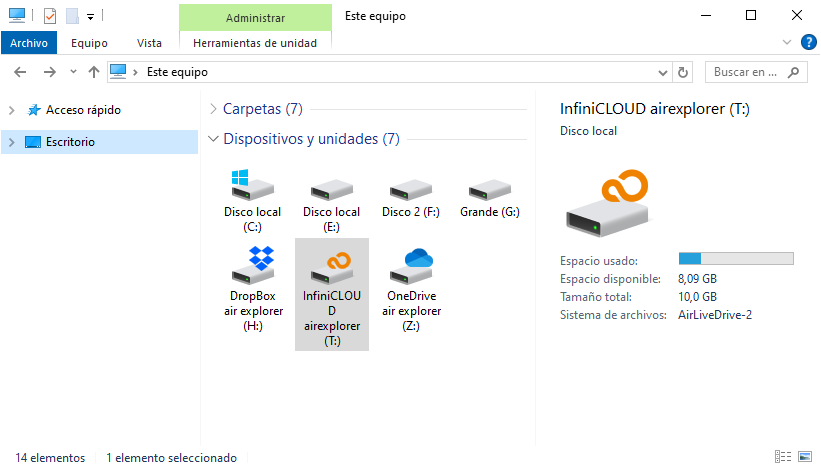
Why Air Live Drive is the best choice
Unlike traditional sync clients, Air Live Drive doesn’t require you to mirror files on your hard drive. As a result, your local storage remains uncluttered, workflows become faster because files are instantly accessible, and organization improves since each cloud account appears as its own clearly defined disk. Whether you’re a freelancer handling client projects, a student juggling multiple accounts, or a business relying on different providers, Air Live Drive streamlines cloud management and makes it far more efficient.
Comparison: Multiple cloud accounts vs. Air Live Drive
| Working with multiple cloud accounts (without third-party software) | Working with Air Live Drive |
|---|---|
| Constantly switching between different cloud platforms and browser tabs | All cloud accounts mounted as local disks, accessible directly from File Explorer |
| Multiple logins required, leading to confusion and wasted time | Single interface with saved credentials for quick access |
| Files often need to be downloaded before editing | Edit files directly in the cloud using desktop apps (Word, Photoshop, Excel, etc.) |
| Sync clients duplicate files locally, consuming disk space | No synchronization needed, files remain in the cloud, saving local storage |
| Difficult to manage multiple accounts from the same provider | Supports multiple accounts per provider, each appearing as a separate disk |
| Organization suffers when juggling different clouds manually | Clear structure: each cloud account is mapped as its own drive |
| Slower workflows due to constant switching and manual handling | Faster workflows with seamless integration into daily tools |
| Limited compatibility across different providers | Works with Google Drive, Dropbox, OneDrive, Mega, and many more |
Final thoughts
Managing multiple cloud accounts doesn’t have to be complicated. With Air Live Drive, you can access all your clouds as local disks easily, streamline your workflow, and focus on what really matters, your work.
Try Air Live Drive today and experience the freedom of working with multiple clouds without the hassle.
You can check more information about more features here:
-Manage and edit cloud files without syncing
-Mount Google Drive as a Windows drive – Step by step guide
-Cloud mapping made simple
